
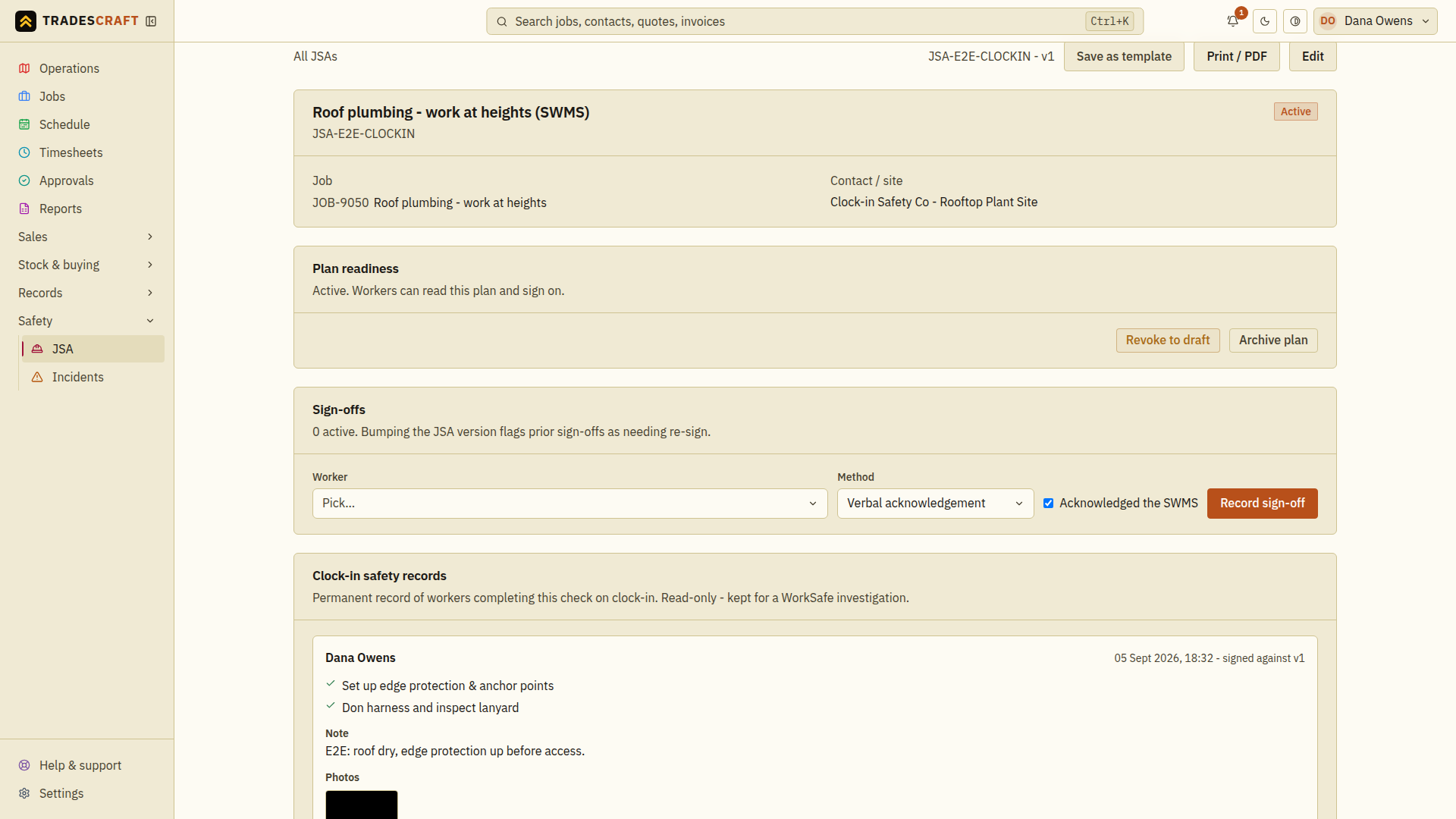
This page records a manual sign-off: someone signed a paper sheet, you ran a toolbox talk and took a verbal acknowledgement, or a subbie confirmed on site. The Sign-offs card on the JSA is where you enter it.
A clock-on pre-start check is a different record. It is stored under Clock-in safety records and is created only when the worker completes the safety check in the app; clocking on does not silently create a manual sign-off.
Record one
- Open the JSA (Safety → JSA, then the plan) and find the Sign-offs card.
- Pick the worker - anyone on your team or an invited subcontractor.
- Choose the method:
- Verbal acknowledgement - the default for a toolbox-talk sign-on.
- Wet signature - they signed a printed copy that you retain as evidence.
- Confirm the worker has read and understood the current plan. Tick Acknowledged the SWMS only when that is true, then choose Record sign-off. Wait for Sign-off recorded and check the worker and version in the list. Do not record an acknowledgement they have not given.
The worker appears in the sign-offs list with their trade, the method and the plan version they signed against.
This form records your confirmation that the worker acknowledged the plan. It does not collect their signature on screen. To collect a signature in Tradescraft, turn on Require a signature for the clock-on safety check instead.
Keeping sign-offs current
- If you revise the plan, its version bumps and older sign-offs are flagged needs re-sign - the list marks them, so you can see at a glance who still needs to re-confirm against the latest version.
- Sign-offs are never deleted by revising or archiving a plan; they stay on file as part of the record.
Good to know
- This is the manual path. To make the app force a pre-start acknowledgement (with configured steps, photo, note or signature) before clock-on, set up clock-on safety checks instead.
- Need to add someone first? You can only sign off people who are on your team or invited as a subcontractor - see Your team.